
What is actually inside a hard drive?
To understand why data recovery is as complex as it is, you first need to understand how a hard drive works.
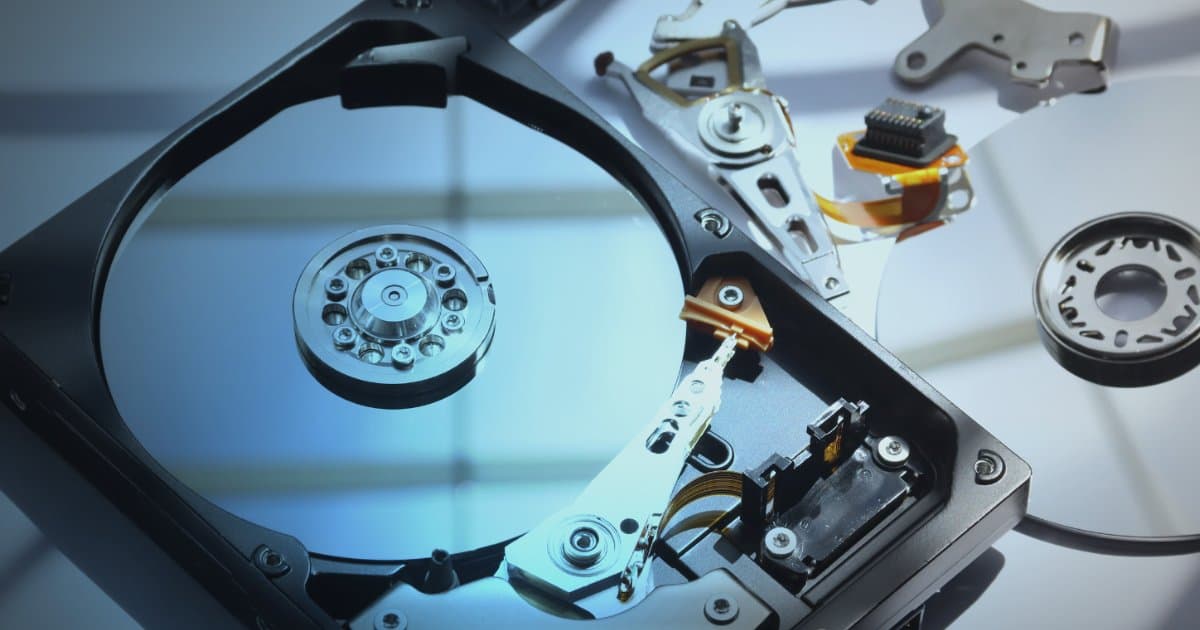
Inside a hard drive there are one or more platters spinning at tremendous speed, typically 5,400 to 7,200 revolutions per minute. Your data is stored on a micro-thin magnetic layer on the surface of these platters. The read/write head floats above the platters at an extremely small distance, about 10 nanometers, which corresponds to roughly one thousandth of the thickness of a human hair.
This is therefore a very finely tuned piece of hardware, and unfortunately a very delicate one. When something goes wrong, the consequences can be dire if the situation is not handled correctly right from the start.
The most common failures
Read/write head failure (Head Crash): This is among the most serious failures that can occur. The read/write head, which should never touch the platters, "lands" on them with force, either because of an impact, a fall or simply because of wear. When the head touches the platter at this high rotational speed, it can in some cases scrape the magnetic layer right off the surface. The data that was stored there is shredded and turned to dust.
Rotational scoring: If the drive is left running after such a failure, the read/write head digs deep grooves into the platter, circle after circle. The longer the device runs, the greater the destruction.
Failed motor or spindle: Sometimes the drive simply refuses to spin. This can be caused by a motor failure or by the read/write head having stuck to the platter (so-called stiction). Such cases require specialized tools and precision: it is not enough to "open it up and try things out".
Electronic failures and the controller board: The controller board (PCB) is the brain of the device. It holds special firmware (firmware) that is unique to each individual drive. It is a common misconception that you can swap the board by taking an identical board from another drive; without transferring the exact data from the firmware, the drive will not work.
Logical damage (Logical Damage): Sometimes the hardware is fine but the file system becomes corrupted. The information about where files and folders are stored is then lost. This is comparable to a book with its table of contents torn out: the story is still there, but finding the right pages is an enormous task.
The golden rule: If you hear clicking, grinding or squeaking from the drive, switch it off immediately.
Why isn't an "ordinary computer repair shop" enough?
At Datatech we have too often received drives that have been handled by untrained people. The outcome is almost invariably the same: the damage has increased so much that recovery has become impossible.
Here are the most common mistakes:
Drive opened in a dirty environment: Ordinary air is full of airborne particles. If a single speck of dust lands between the read/write head and the platter, it acts like sandpaper when the drive spins up.
Read/write heads replaced without the right tools: Read/write heads are so delicate that if they touch each other during installation, they are ruined. Old-fashioned methods using rubber or paper are long obsolete and extremely dangerous.
Incorrect handling of the controller board: Fitting the wrong PCB to the drive risks overwriting important system areas, which makes the data permanently inaccessible.
Repeated power-ons: People often hope the drive will "fix itself" if they try again and again. If a mechanical failure is present, every second of running time further destroys the platters that hold the actual data.
How does Datatech work?
We have invested in specialized technical equipment from Acelab and set up the best facility available to ensure maximum success in data recovery:
Cleanbooth: We use dedicated SentryAir cleanbooths with HEPA filters that remove 99.97% of all airborne particles. This is the only safe environment in which to open a hard drive.
PC-3000 data recovery equipment: We use the best in the industry in this field from ACE Lab. The equipment allows us to communicate directly with the drive's firmware, bypassing the computer's operating system, and to read data sector by sector (sector-by-sector) without overstressing delicate components.
Precision tools from HDDSurgery: We use custom-made head combs for each type of drive. This ensures that read/write heads can be removed and installed without coming into contact with the platters or with one another.
What should you do if your drive fails?
If you suspect that your hard drive is failing, or if you hear strange noises from it, the advice is simple:
Switch off the computer immediately.
Do not try to connect it again.
Turn to the experts.
The first recovery attempt is always the most important one. With every failed attempt by untrained people, the chances of the data ever seeing the light of day again shrink.
Have a failed drive? Contact us at Datatech. We offer a professional diagnosis and a realistic assessment of the recovery prospects before any work is undertaken.
Need help with data recovery?
The first step is to send us a service request. Get in touch with us today.
Contact us